


GG-Osc Indicator: The Multi-Engine Oscillator for TradingView
GG-Osc is GG-Shot's invite-only multi-engine oscillator for TradingView. It combines three analysis engines - RSI, SDO, and EOT - in one indicator with four display modes. Divergences, entry signals, continuation patterns, and confluence detection, all in a single sub-window.
It works on any market - crypto, forex, stocks - and any timeframe. Every mode has its own settings group in the indicator properties, so lengths, levels, colors, and visual toggles can all be tuned to your trading style.
How to Add GG-Osc to Your Chart
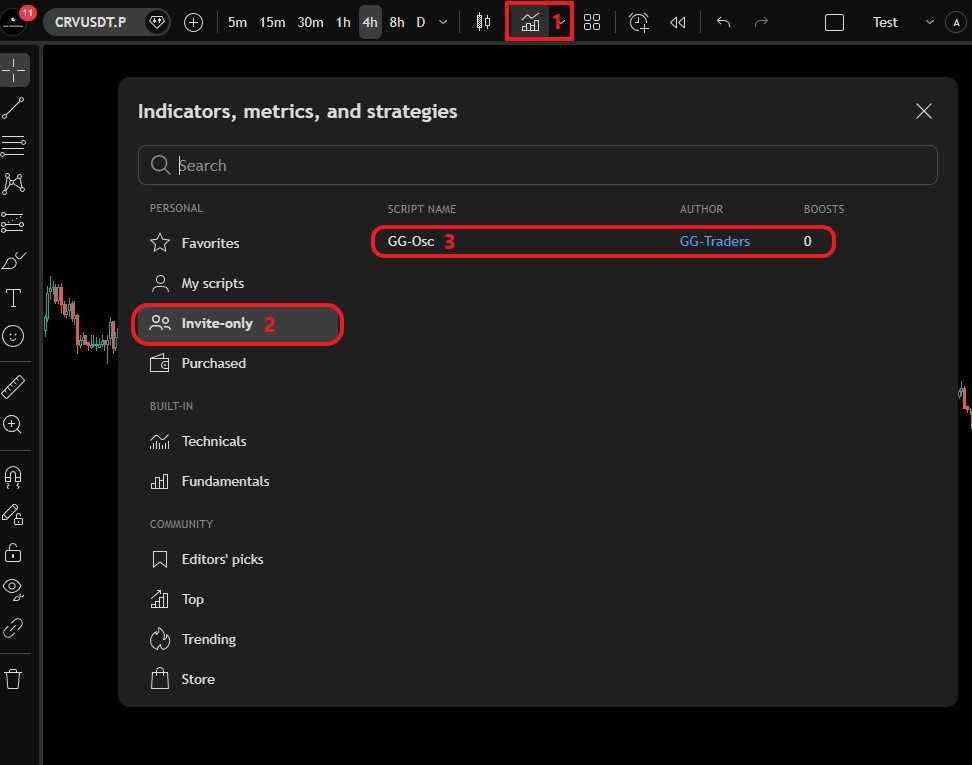
In TradingView, open Indicators & Strategies → Invite-only scripts → click GG-Osc. The indicator appears as a separate panel below your chart. Open its settings (gear icon) and choose the oscillator mode:
- RSI - classic GG-RSI with divergence and pivot detection.
- SDO - Stoch-Donchian Oscillator for momentum reading.
- EOT - Ehlers DSP-based trend oscillator with entry/exit signals.
- Combined - all three overlaid with Flow Fill and confluence detection.
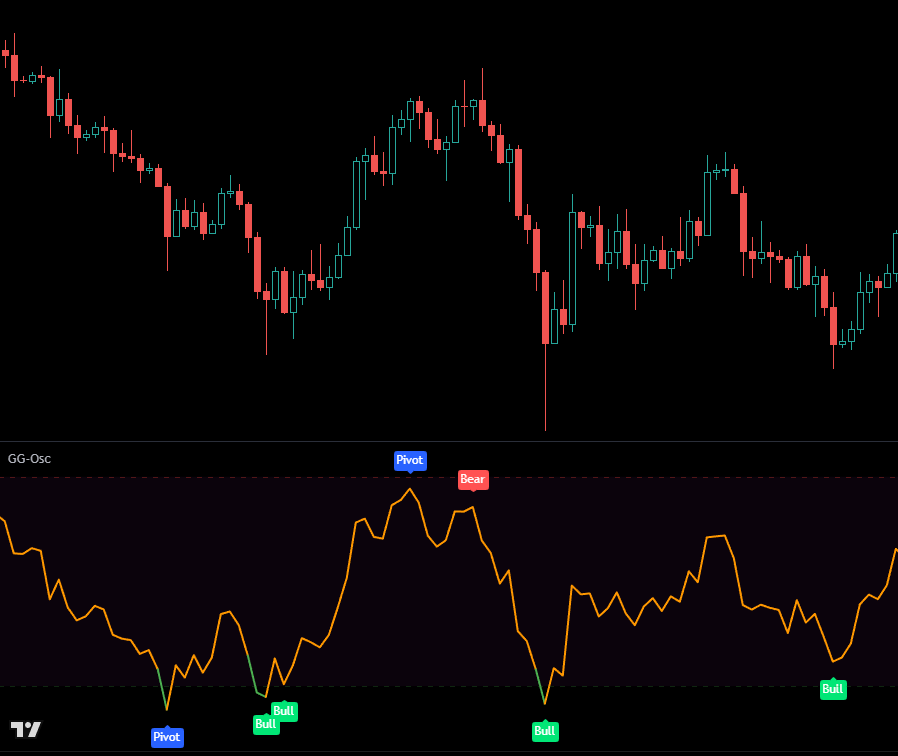
RSI Mode
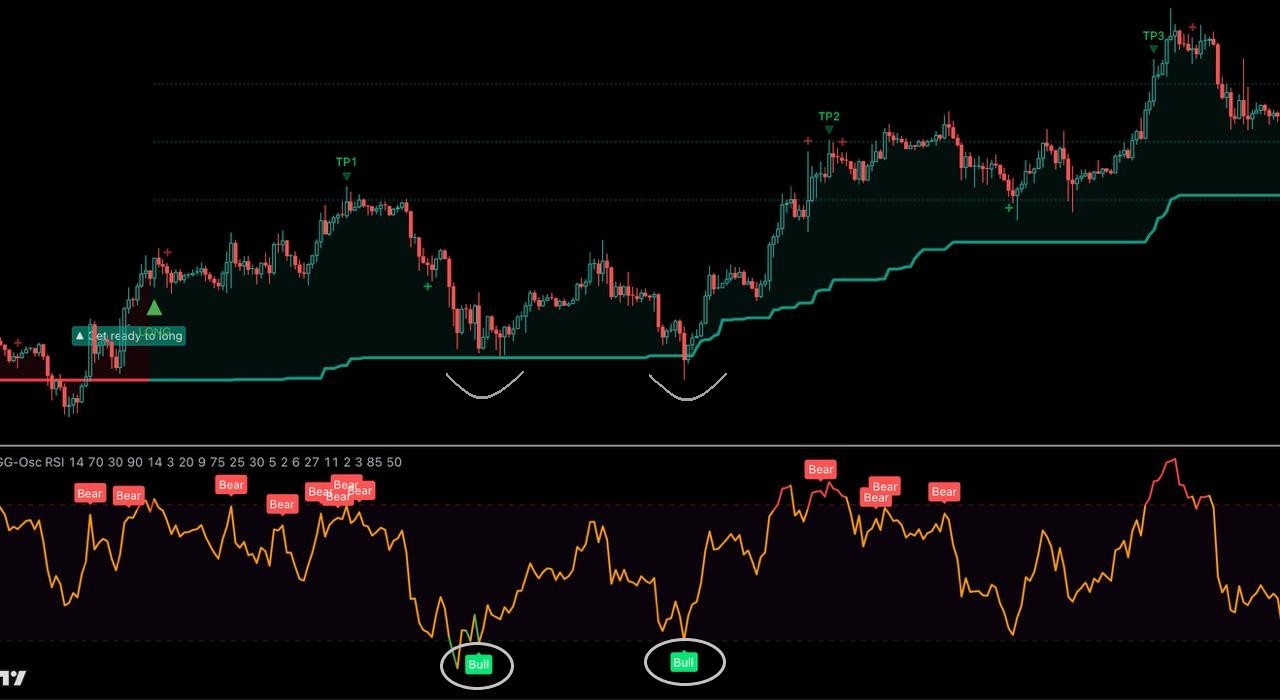
Classic GG-RSI with automatic divergence and pivot detection.
- The line turns red above 70 (overbought) and green below 30 (oversold).
- "Bull" label - bullish divergence: price makes a lower low while RSI makes a higher low. A potential reversal up.
- "Bear" label - bearish divergence: price makes a higher high while RSI makes a lower high.
- "Pivot" label - marks local extremes on the oscillator.
In settings you can adjust RSI length, overbought/oversold levels, line colors, the divergence lookback, and toggle divergences and pivots on or off.
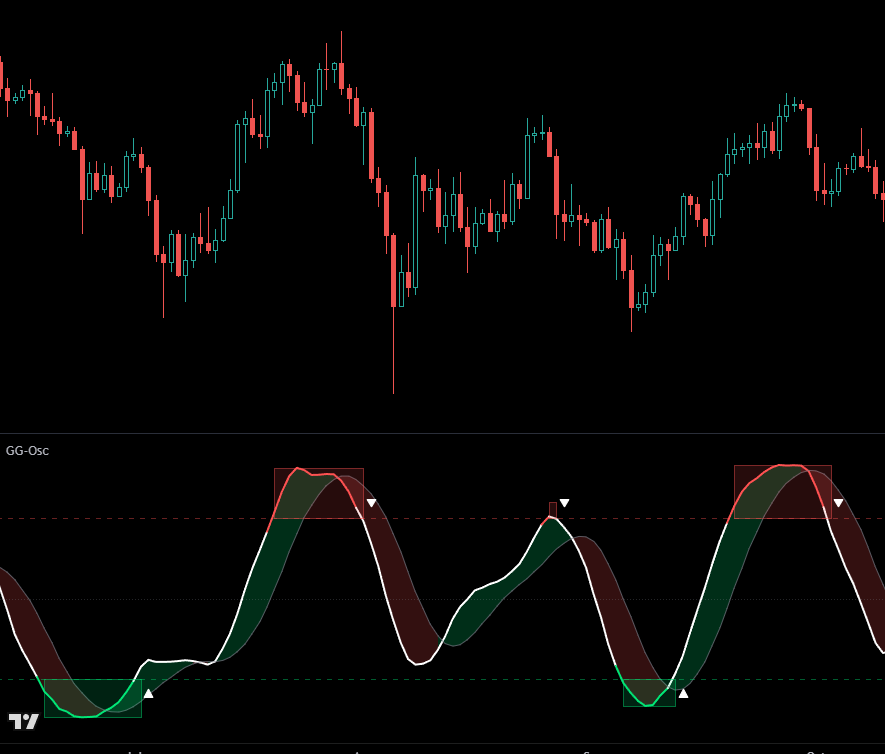
SDO Mode
SDO blends Stochastic and Donchian Channel oscillators into a single smoothed line that reads momentum better than either component alone.
- White line = SDO value, gray line = signal (smoothed SDO).
- Green/red fill between them shows momentum direction.
- Colored zone boxes highlight overbought (red) and oversold (green) periods.
- ▲ up triangle = SDO exits the oversold zone upward - a potential long entry.
- ▼ down triangle = SDO exits the overbought zone downward - a potential short entry.
Key signal - SDO Cross: the most important SDO event is the cross out of an extreme zone. Exiting oversold means selling pressure is exhausted (expect a bounce); exiting overbought means buying pressure is fading.
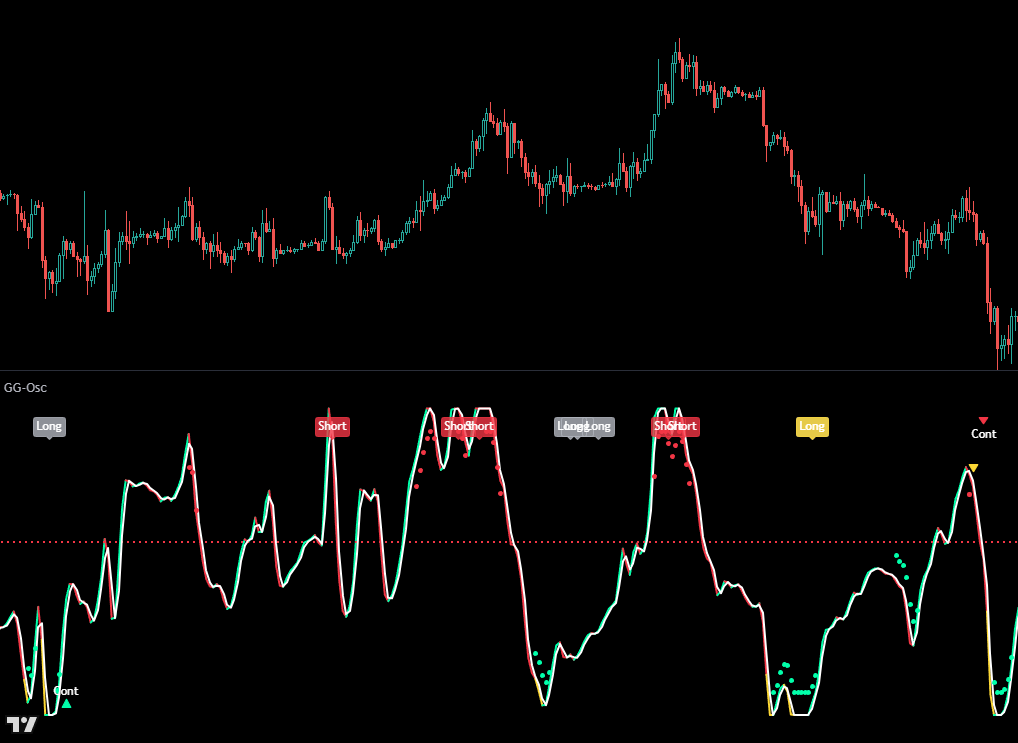
EOT Mode
EOT is built on Ehlers' digital filters and detects trend onset earlier than traditional oscillators.
Line Color - Current State
- Green - bullish trend active. Red - bearish trend active.
- Yellow - deep oversold, market exhausted, watch for reversal.
- White - extreme oversold, even stronger than yellow.
- Purple - full exhaustion: price has been stuck at the bottom for several bars.
Entry Signals
EOT generates four Long signals, strongest to weakest:
- Long (Lime) - strongest. All filters aligned: deep oversold + reversal + volume confirmation.
- Long (Blue) - strong. Reversal after a recent drop below zero.
- Long (Yellow) - medium. Oversold + reversal, fewer filters confirming.
- Long (Gray) - basic. Reversal after weakness, without strong confirmation.
Short (Red) mirrors the Lime Long in the opposite direction: extreme overbought + reversal down. Priority: Lime > Blue > Yellow > Gray - if several labels appear on one bar, follow the highest.
Continuation, Bounce & Pressure
- ▲ Cont (green, bottom) - trend pulled back and resumed up; a good spot to add. ▼ Cont (red, top) - bearish trend resumed down.
- Yellow bounce triangles - early warnings of a bounce from an extreme zone. Against your position - tighten the stop or take partial profit.
- Pressure circles - green (oversold confirmed by volume) or red (overbought confirmed by volume): real volume behind the extreme, not just noise.
- Overbought warnings - orange circle (first warning), red circle + "Overbought" (strong warning: close longs or take partial profit).
Combined Mode
Combined mode overlays all three oscillators on one panel with visual confluence detection - the full-picture view.
- Orange line = RSI, white line = SDO, blue line = EOT, each keeping its own signal markers (■ RSI divergence, ▲ SDO cross, ● EOT entry).
- Flow Fill (cloud): green = bullish momentum, red = bearish; a brighter cloud means stronger conviction, a narrow cloud means a squeeze - expect a breakout.
- Flow Center Line: the EMA-smoothed average of all three. Green = bullish, red = bearish, yellow = squeeze (energy compressing, a strong move is coming).
★ Confluence Signal fires when 2 or more oscillators agree on the same bar - ★ LONG (green, bottom) or ★ SHORT (red, top). Confluence is the highest-priority signal in GG-Osc.

Alerts
GG-Osc uses one universal alert for every signal and event. Open the Alerts menu (clock icon), select GG-Osc as the source, then choose "Any alert() function call". Set it once and GG-Osc will notify you for EOT Long/Short entries, continuation signals, RSI divergences, SDO Long/Short, ★ Confluence, and bounce signals. The message identifies the exact event, and alerts work across all engines no matter which mode is on screen.
Using GG-Osc with the GG-Shot Indicator
GG-Osc works standalone, but pairs perfectly with the GG-Shot Indicator:
- Entry confirmation: GG-Shot gives a signal - check the oscillator. If it confirms (divergence, ★ Confluence), enter with confidence; if not, reduce size or wait.
- Re-entry: price bounces off the GG-Shot trend line in the signal direction and the oscillator shows a divergence - re-enter with the stop behind the trend line.
- Exit on cross: GG-Shot's dynamic TP is hit and a cross appears against your position - close the full position.
- Divergence filter: GG-Shot signals Long but the oscillator shows a bearish divergence - wait for a pullback or enter with minimal size.
How to Get GG-Osc (Free)
GG-Osc is included free with GG Lite VIP - our free membership for referrals. Sign up on a partner exchange through a GG-Shot referral, verify in @GGverifed_bot, then send your TradingView username to the bot. Access is granted on TradingView, usually within a day - free for your first month, and lifetime after 3 months of active membership.