


Bybit Trading Bot in Telegram: Auto-Trading Without API Keys
Most Bybit trading bots ask you to create an API key and paste the key and its secret into a third-party service. GG-Shot connects through Bybit's own authorization page instead: you log in on bybit.com and approve access for GG-Shot. After that, GG-Shot signals trade on your Bybit account from Telegram, by your own preset: in one tap on a signal card, or automatically with a Desk.
Connect Bybit Without API Keys
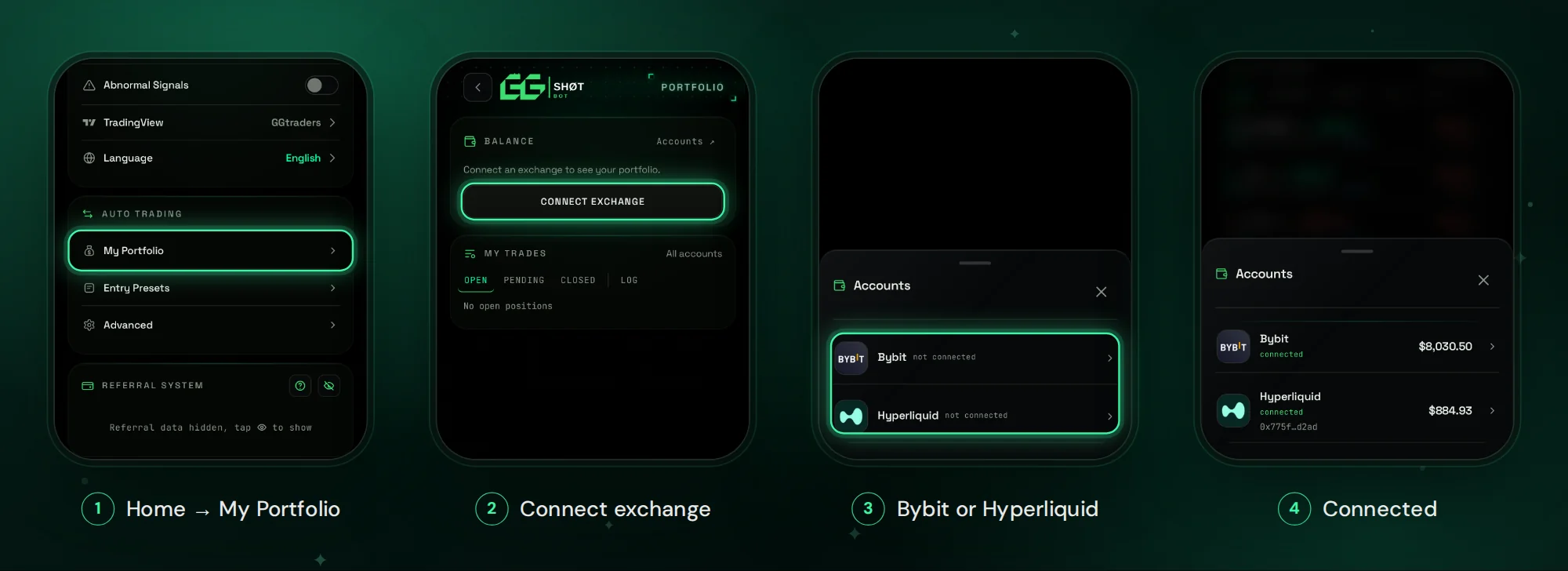
- Open @GGShot_Bot, launch the GGShot Mini App and go to Home → AUTO TRADING → My Portfolio.
- Tap Connect exchange and choose Bybit.
- Bybit opens in your browser: log in and approve access for GG-Shot.
- When the page shows Bybit connected, return to Telegram. Bybit appears as connected with your equity.
Trades use the USDT in your Unified Trading Account. Funds in the Funding account are not used: move them in Bybit with Assets → Transfer. On a Unified Trading Account the margin mode is set for the whole account in Bybit.
What You Can Trade on Bybit
- About 480 assets on Bybit have ready GG-Shot strategies.
- Crypto: BTC, ETH, SOL, XRP and other majors, altcoins, DeFi, AI tokens and memecoins.
- 60+ stocks, ETFs and commodities from Bybit's TradFi contracts: NVDA, TSLA, AAPL, SPY, QQQ, gold, silver, WTI and Brent oil. More in Hyperliquid Stocks, which covers both exchanges.
Each strategy is one asset on one timeframe, from 5M to 1D, with its own accuracy, number of trades, profit factor and average hold time.
What Arrives in Telegram
Every signal comes with its entry zone, Stop Loss, TP1–TP4 and the strategy's historical accuracy, plus VΛLIDATOR analysis: a 0–100 score of the setup and a plan for the entry. Target and stop reports follow the signal. More in GG-Shot Telegram Bot: Signals, Desks and Auto-Trading.
Entry Presets: How the Bot Enters
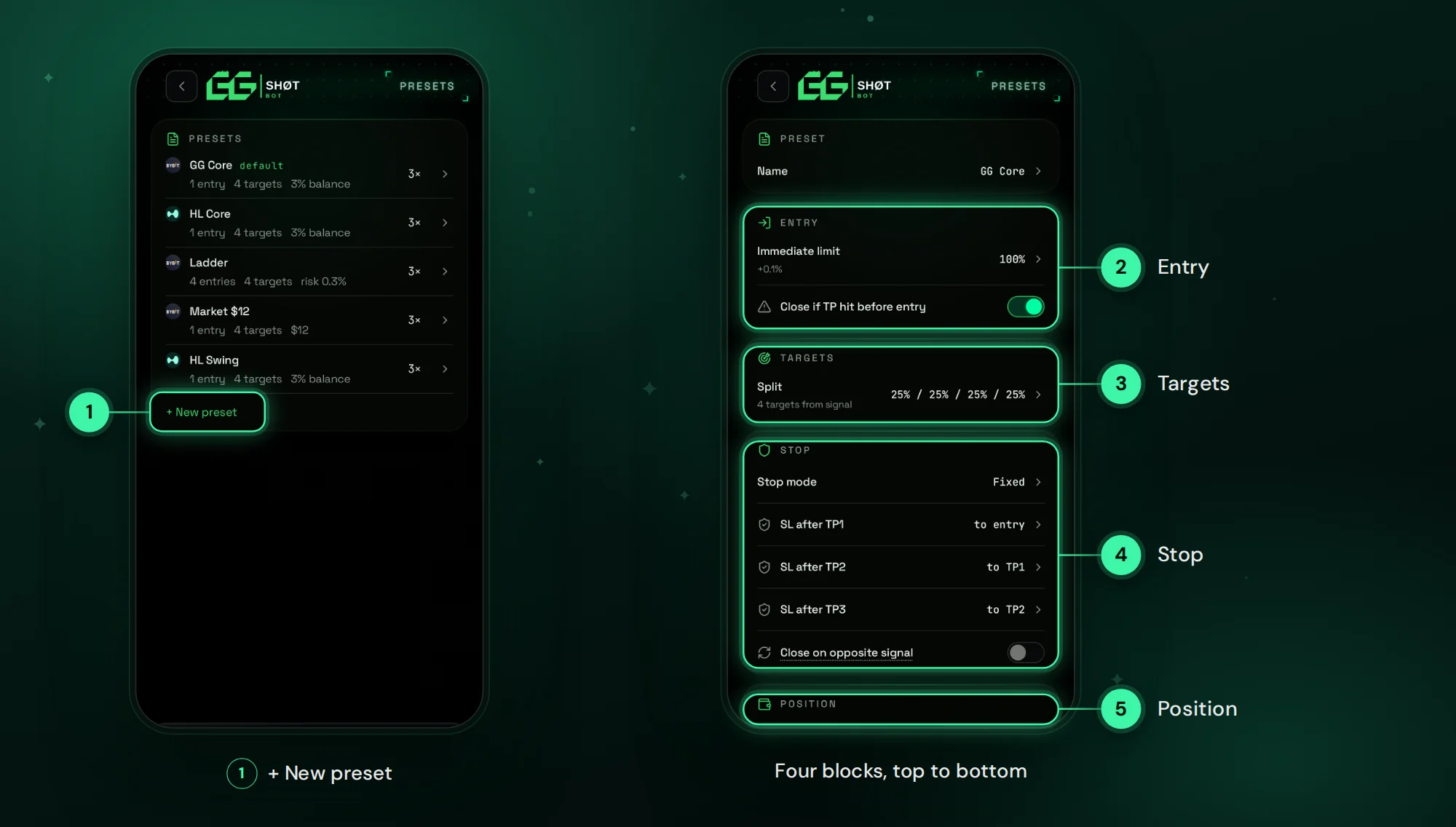
An Entry Preset is your trading template. You set it once in Home → AUTO TRADING → Entry Presets:
- Entry: Market or Limit, one level or up to four levels inside the signal's entry zone, each with its share of the position.
- Targets: the position is split across TP1–TP4, for example 25% at each.
- Stop: Fixed or Trailing along the indicator line; after TP1 move the stop to entry, to break-even or keep it.
- Position: share of balance, fixed amount or risk per trade, leverage from 1× to 20× capped by each contract's maximum.
Automate a Desk on Bybit
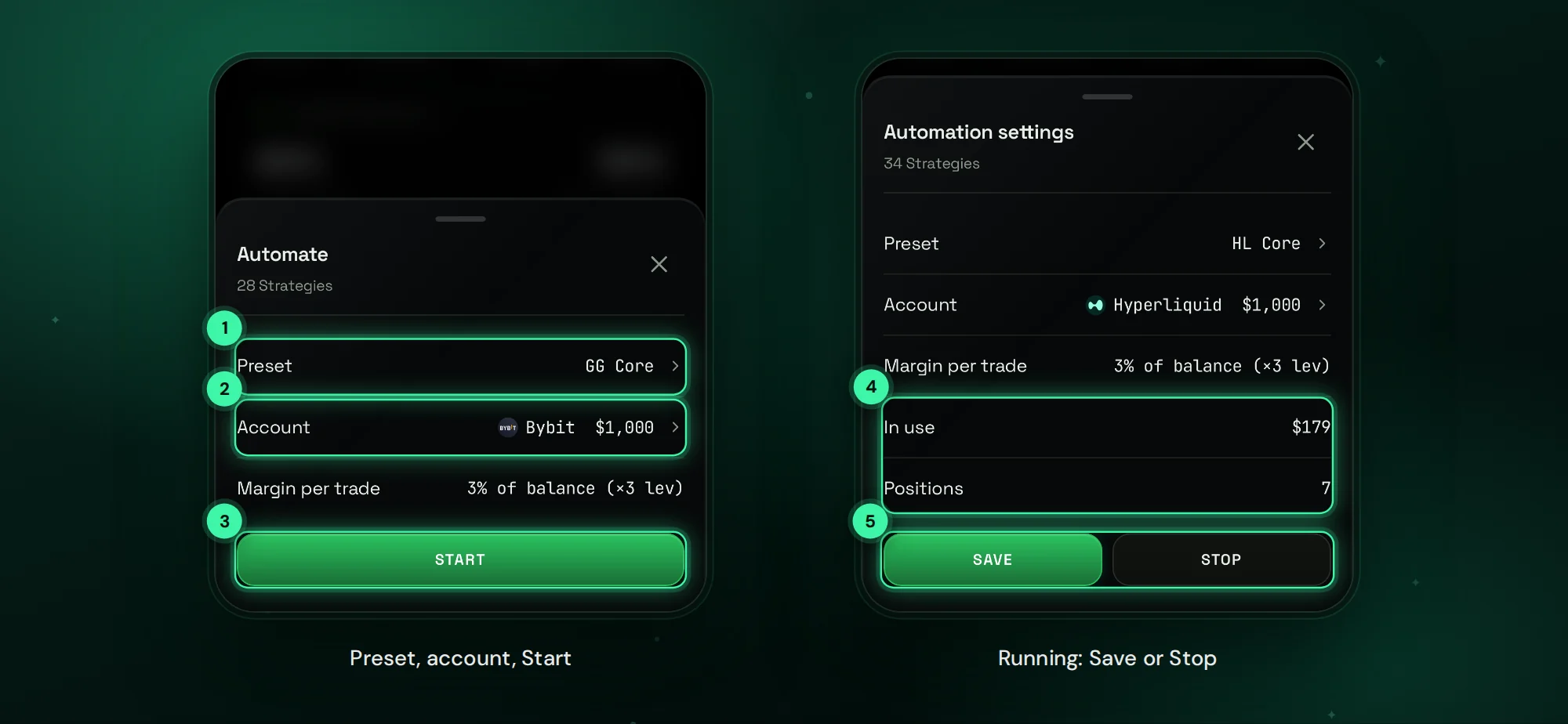
A desk is a set of strategies you pick: for example Bitcoin and Ethereum on 15M and 1H, a memecoin desk, or Bybit stocks only. Open the desk, tap Automate, choose the preset and your Bybit account, check margin per trade and tap Start. Every new signal of the desk is entered with the preset; one trade per coin; an opposite signal reverses the position. Stop ends new entries while open trades keep their stop and targets.
Before you automate, run Backtest: it replays the desk on 1-minute candles with Bybit fees, funding, entry delay and slippage, and compares two presets on the same period.
One-Tap Entry from a Signal
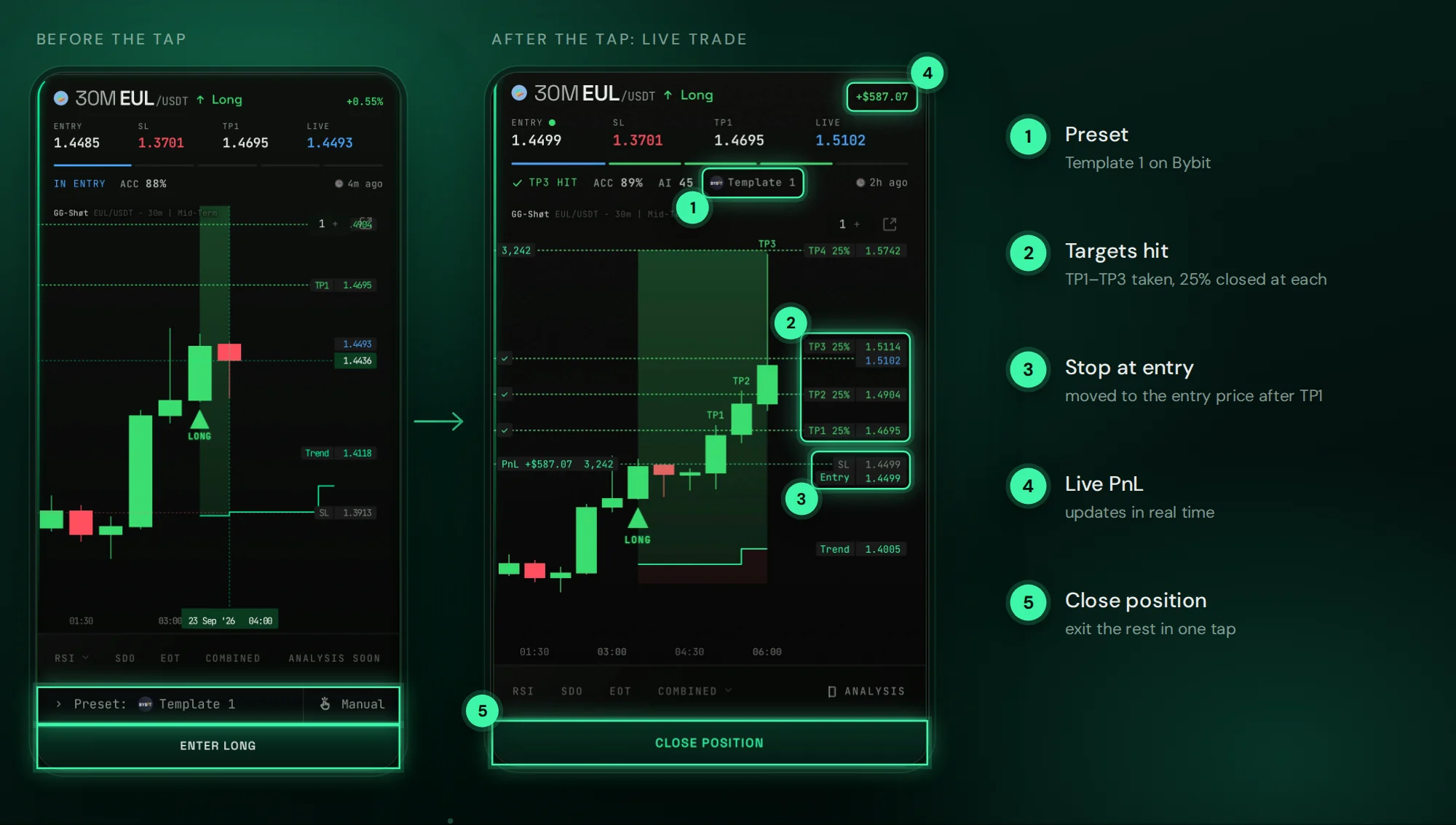
On a signal card, ENTER LONG / ENTER SHORT sends the trade in one tap with your default preset. Once the entry fills, the Stop Loss and Take-Profits are placed on Bybit, targets taken are ticked on the chart and PnL updates in real time. Manual sets your own parameters for one trade, and Close position exits at market.
Troubleshooting
- Bybit shows $0 or a low balance. Move USDT from the Funding account to the Unified Trading Account.
- COIN ALREADY IN TRADE. The account already holds this coin: one trade per coin per account.
- Coin not listed on this exchange. Choose a preset for your other exchange.
FAQ
Do I need a Bybit API key?
No. You approve access for GG-Shot on Bybit's own page. There is no key or secret to copy.
Which Bybit account does it trade?
The Unified Trading Account, with USDT.
Does it keep working when Telegram is closed?
Yes. Orders, stops and targets sit on Bybit, and desk automation runs on the servers.
Can I use Bybit and Hyperliquid together?
Yes, up to two accounts at the same time, with one preset per exchange. See Hyperliquid Trading Bot in Telegram.
What does it cost?
Auto-trading is part of GG-Shot Premium. Plans run for 1, 3 or 12 months; current prices are in @GGShot_Bot.
Get Started
Open @GGShot_Bot, launch the Mini App, connect Bybit in Home → AUTO TRADING → My Portfolio and build your first desk. No Bybit account yet? Register with code GGSHOT. Every setting is described in the GG-Shot Auto-Trading: Complete Guide.