


Hyperliquid Stocks: Trade NVDA, TSLA, Gold and Oil with Signals
Crypto exchanges now list contracts on stocks, indices and commodities. On Hyperliquid they come as perpetual markets launched under HIP-3; Bybit lists TradFi perpetual contracts in USDT. GG-Shot has strategies for these markets, so NVDA, TSLA, gold or oil signals arrive in Telegram the same way as Bitcoin signals, and the GGShot Mini App can trade them for you.
What Are Stock Perpetuals
- A perpetual contract follows the price of a stock, index or commodity. You can go long or short with leverage, and there is no expiry.
- You do not own the shares: no dividends and no voting rights.
- On Hyperliquid, HIP-3 lets builders deploy their own perpetual markets, each with its own price oracle, fees and leverage limits. These markets trade around the clock, including weekends.
- On Bybit, TradFi perpetuals are quoted and settled in USDT and also trade around the clock.
When the stock market is closed, the price comes from trading on the crypto exchange itself and can move on news. Stops matter more on weekends.
Which Markets GG-Shot Covers
Hyperliquid: 75+ stocks, indices and commodities
- Mag 7 & Big Tech: NVDA, AAPL, MSFT, GOOGL, META, AMZN, TSLA, AVGO, ORCL, NFLX.
- Memory & Chips: MU, AMD, INTC, TSM, ARM, ASML, QCOM, AMAT, Samsung, SK Hynix and more.
- Indices & Commodities: the S&P 500, Nikkei 225, gold, silver, platinum, palladium, copper, WTI and Brent oil, natural gas.
- Stocks: PLTR, RKLB, LLY, IBM, BABA, GME and others.
- Crypto Stocks: COIN, MSTR, HOOD, CRCL and others.
Bybit: 60+ stocks, ETFs and commodities
- NVDA, TSLA, AAPL, MSFT, GOOGL, META, AMZN, AVGO, ORCL.
- ETFs: SPY, QQQ, TQQQ, SOXL and others.
- Gold, silver, WTI and Brent oil.
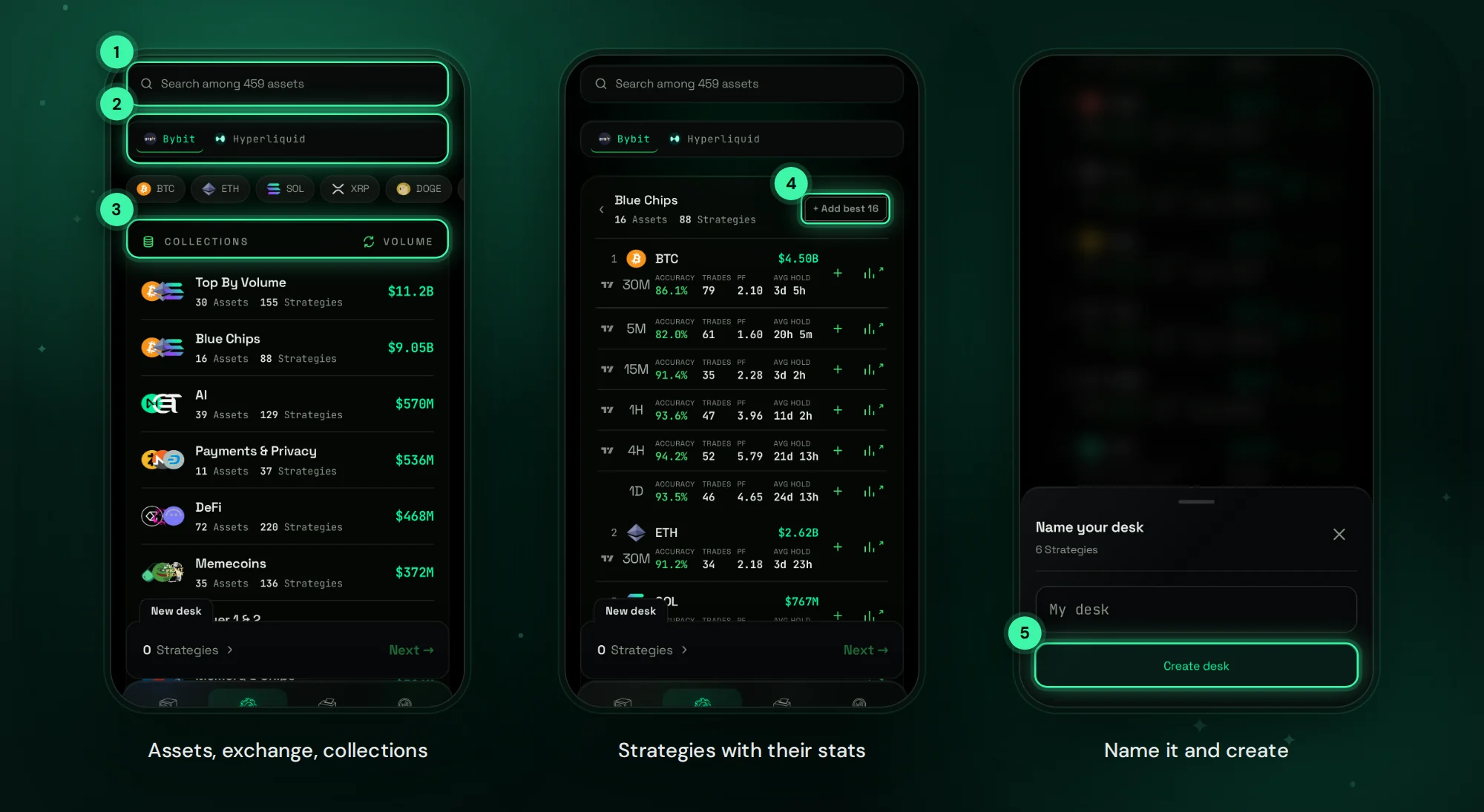
Each strategy is one market on one timeframe with its own accuracy, number of trades, profit factor and average hold time. For most stocks the timeframes run from 5M to 1H, with 4H on several large caps.
Build a Stocks Desk
- In the Desks tab tap + New desk and choose Hyperliquid or Bybit.
- Open a collection such as Mag 7 & Big Tech, Memory & Chips or Indices & Commodities.
- Add strategies with +, or tap + Add best to take the strongest strategy of every asset in the collection.
- Name the desk and tap Create desk.
Example desks: big tech only; chipmakers; gold, silver and oil; or a single stock you follow. You can keep up to three desks of your own next to Default, with up to 150 strategies in total.
Backtest, Then Automate
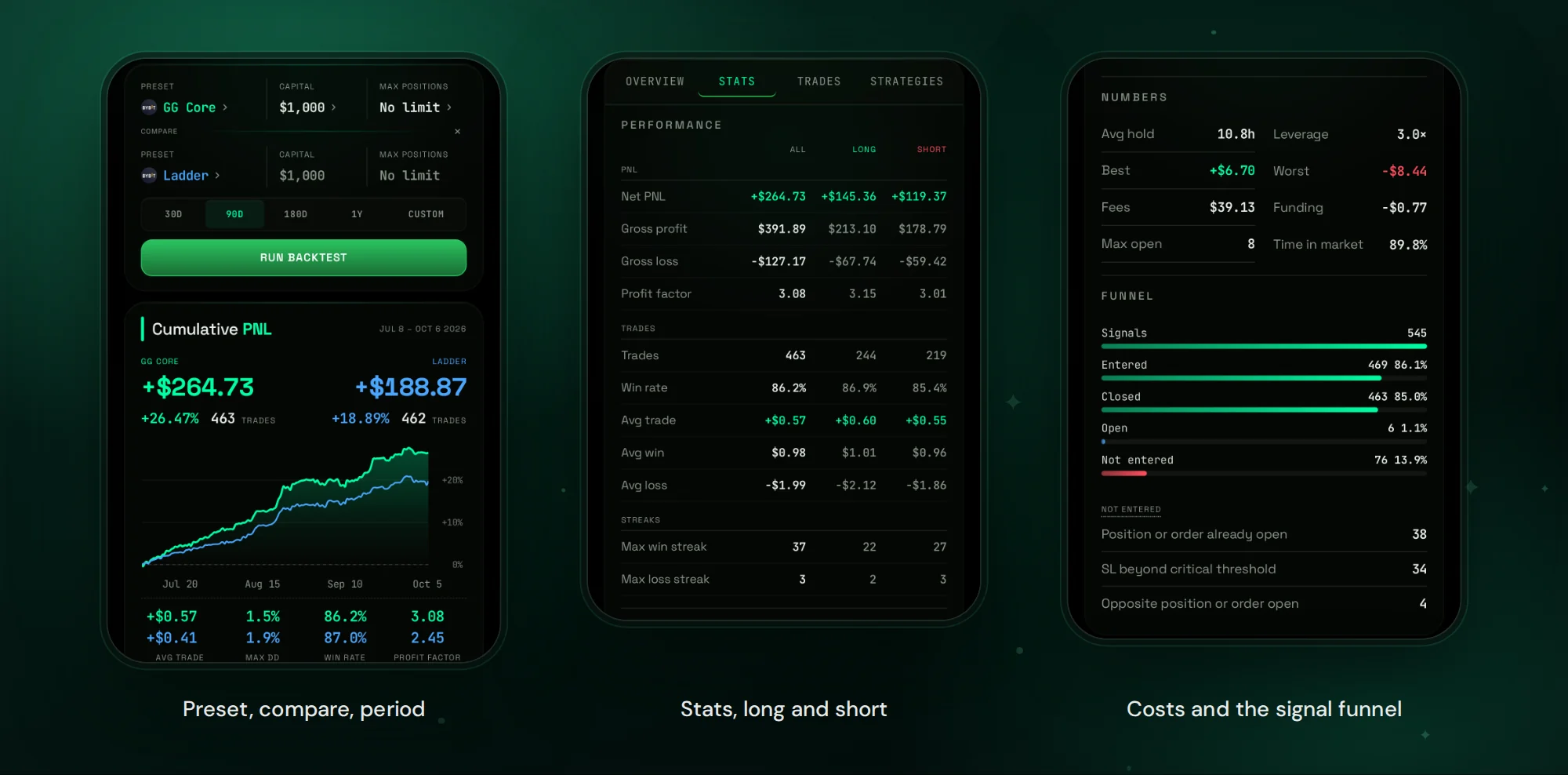
Backtest replays the desk on 1-minute candles with fees, funding, entry delay and slippage, so the costs of each market are part of the result. When a preset fits, Automate enters every new signal of the desk with it. Or keep the desk for alerts and enter by hand with one tap. Exchange setup is covered in Hyperliquid Trading Bot in Telegram and Bybit Trading Bot in Telegram.
Before You Trade Stock Perpetuals
- Fees and funding are set per market and differ from crypto. The backtest includes them.
- Liquidity is thinner than on Bitcoin, so fewer timeframes have strategies.
- Leverage is capped by each market's maximum, whatever your preset says.
- Prices keep moving when the stock market is closed. Size positions with that in mind.
FAQ
Can I trade NVDA on Hyperliquid?
Yes, as a perpetual contract. GG-Shot has strategies for NVDA on Hyperliquid and on Bybit.
Do I own the shares?
No. A perpetual follows the price; there are no dividends and no voting rights.
Do these markets trade on weekends?
Yes. Stock perpetuals on Hyperliquid and Bybit trade around the clock.
Can I automate a desk of stocks only?
Yes. Build a desk from the stock collections and tap Automate.
Where do the signals come from?
From the GG-Shot Indicator, the same system used for crypto. More in GG-Shot Indicator: The Ultimate Trading Tool.
Get Started
Open @GGShot_Bot, launch the Mini App and open the Desks tab. Every setting is described in the GG-Shot Auto-Trading: Complete Guide.